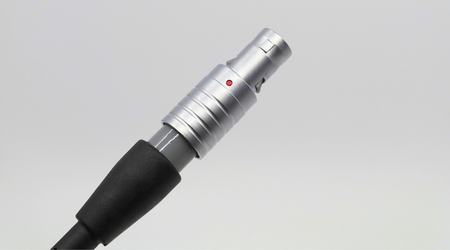
A LEMO plug, also known as a panel power or a 6-pin connector, is a specialized 6-pin circular connector primarily used in aviation to plug pilot headsets directly into an aircraft’s instrument panel. Much like its Dual GA and Heli (U-174) plug configuration counterparts, it supplies audio and microphone signals from the aircraft panel to the headset. Where it differs is that it also delivers electrical power straight from the aircraft to the headset. A LEMO plug is simple to use once the plug and the aircraft panel port are lined up correctly. The key to avoiding issues when plugging or unplugging the cable from your panel is to treat the connector as a guided fit, not a twist-lock fitting. This guide explains how to properly insert, remove, and troubleshoot an aviation headset or helmet LEMO plug without damaging the plug or the port.
What Should You Check Before Connecting Your Plug?
Before connecting your headset or helmet to your aircraft panel, look at both the plug and panel port. The LEMO plug used on compatible aviation headsets and helmets conforms to industry standard specifications and is not different from brand to brand.
Check for three things before connecting the plug to the panel:
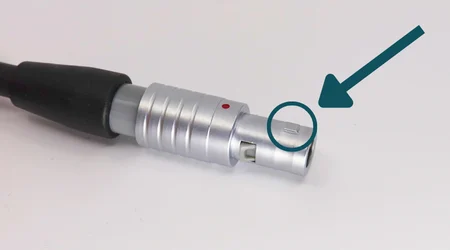
- Find the red dot on the plug: The red dot located on your LEMO connector marks the position of the plug’s “tooth”, similar to the tooth on a key.
- The channel inside the aircraft port: The LEMO port has a matching channel designed to fit the tooth located in your connector.
- Damage to the plug or port: Check the pins and tooth on your plug and make sure there is no noticeable damage before attempting to insert the plug. Similarly, be sure to check the panel port for visible damage that might hinder an easy connection.
Follow the Correct Connection Steps
- Hold the headset or helmet LEMO plug close enough to see the red dot clearly. That dot tells you where the tooth is positioned on the plug. If you ignore it, the connector might begin to plug in but will not be able to fully insert into the port.
- Line up the red dot on your plug with the channel on your aircraft panel port. Position the red dot so the tooth is aligned with the port channel. Once aligned, the aviation headset LEMO plug should move straight into the port with light, even pressure. Do not rotate or twist the connector to force the plug into the port.
- Push the plug straight into the port until it is fully seated. Avoid rocking, twisting, or angling the connector. If the plug does not slide smoothly, pull it back out, recheck the dot-to-channel alignment, and try again.
- Remove the plug straight out when disconnecting the LEMO plug from your panel, pulling the plug straight out along the same path. Do not twist during removal. Twisting after insertion can move the tooth into the wrong groove inside the LEMO port, which is the common way a plug becomes stuck.
What Should You Do if the Plug Becomes Stuck?
If your plug will not disconnect from the panel easily, do not yank on the cable. Hold the casing of the LEMO plug and gently twist the casing until the tooth pops back into the correct channel. Once it realigns, the plug should pull straight out easily.
If gentle twisting does not free the plug, do not apply further force. As a last resort, the LEMO port may need to be removed from the aircraft so the plug can be extracted safely.
Quick Release Plug Options
Lightspeed Aviation offers a similar quick disconnect cable with the Zulu H-Mod helmet-installed system for pilots who need a fast, safe egress. The Zulu H-Mod is a fully engineered ANR solution only for helmets and comes with our strong and flexible Kevlar reinforced cable assemble, integrated Bluetooth®, and this quick-disconnect cable that has a 9-pound pull force (4kg) that makes emergency egress even safer.
In this case, the same red dot alignment is helpful in connecting and disconnecting the two sections of the upper cable should emergency egress be required.
Be sure to Subscribe to the Lightspeed Aviation Newsletter for updates, resources, and future programs!