How Do I Record My Flight Comms?
Being able to record your flight communications and listen back later can be an incredibly useful tool for pilots at any experience level. Student pilots can revisit ATC calls and instructional flights, while CFIs can review flights with students to identify learning opportunities that may have been missed in the moment.
All Lightspeed premium aviation headsets currently available allow pilots to record, play back, and save cockpit communications using their compatible iOS app developed by Lightspeed. The app you’ll use depends on your headset.
Key Takeaways
- Lightspeed Delta Zulu® uses the Lightspeed App for flight recording and playback.
- Zulu 4 uses the Lightspeed Aviation App to record and review flight communications.
- Zulu 3, Tango, Sierra, PFX, and compatible Zulu.2 headsets use FlightLink™.
- Flight recordings can be especially useful for student pilots and CFIs who want to review ATC communications and instructional flights.
- Depending on the app, pilots can record communications, replay recent transmissions, and save recordings for post-flight review and training.
- The correct Lightspeed app depends on the headset you own.
Which iOS Application Does My Lightspeed Headset Use?
The easiest way to determine which app you need is by your headset:
The Lightspeed Delta Zulu uses the Lightspeed App

The Zulu 4 uses the Lightspeed Aviation App

The Zulu 3, Sierra, and legacy Lightspeed headsets use the FlightLink App

Whichever compatible Lightspeed headset you fly with, recording your cockpit communications gives you another resource for reviewing flights, revisiting ATC calls, and getting more out of post-flight briefings and training.
How Do I Record Flight Comms with Lightspeed Delta Zulu?
Lightspeed Delta Zulu owners can record flight communications using the Lightspeed App.
How to Start a Recording using your Lightspeed Delta Zulu
- Make sure your Lightspeed Delta Zulu is connected to your aircraft’s intercom via a LEMO (6-pin), Dual GA, or Heli plug, and pair the headset with your iPhone or iPad using Bluetooth.
- Open the Lightspeed App and select the recording option from the bottom menu.
- Select your preferred recording input:
- iPad or iPhone Mic: Records what your device’s microphone picks up, including ambient cockpit noise.
- Cabin Only: Records audio through your headset microphone without incoming audio from the communications panel.
- Cabin and ATC: Records audio coming through the aircraft’s communications panel along with your headset microphone. This provides the most complete recording of your flight communications.
- Tap the silver and red record button to begin recording.
In addition to supporting features exclusive to the Lightspeed Delta Zulu, such as HearingEQity® and CO Monitoring with audible alerts, the Lightspeed App gives pilots the ability to record their cockpit communications for playback and review. Learn more about the Lightspeed App.
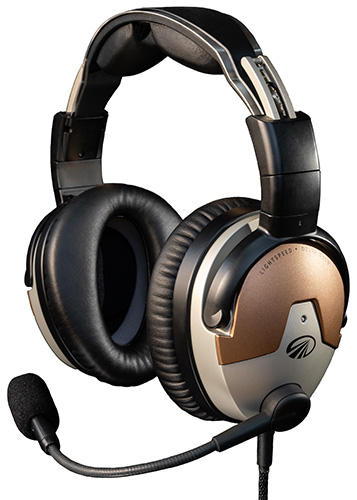
Lightspeed Delta Zulu®
Lightspeed creates products to protect and save lives and manufactures the best, most premium aviation headsets for pilots. The Lightspeed Delta Zulu® ANR headset is built for pilots who understand the importance of comfort, safety, and control. It includes our best ANR to date, with the superior comfort and durability you expect from a Zulu series headset from Lightspeed, while also introducing groundbreaking smart technology that has saved the lives of pilots and their passengers.
Try for yourself! The Lightspeed Delta Zulu has a 30-day Money Back Guarantee
How Do I Record Flight Comms with Zulu 4?
Zulu 4 expands the flexibility of the Zulu family with the Lightspeed Aviation App, a free in-flight cockpit recording application for compatible Apple iPhone and iPad devices.
How to Start a Recording using your Zulu 4
- Make sure your Zulu 4 is connected to your aircraft’s intercom via a LEMO (6-pin), Dual GA, or Heli plug, and pair the headset with your iPhone or iPad using Bluetooth.
- Open the Lightspeed Aviation App
- Select your preferred recording input:
- iPad or iPhone Mic: Records what your device’s microphone picks up, including ambient cockpit noise.
- Cabin Only: Records audio through your headset microphone without incoming audio from the communications panel.
- Cabin and ATC: Records audio coming through the aircraft’s communications panel along with your headset microphone. This provides the most complete recording of your flight communications.
- Tap the silver and red record button to begin recording.
The Lightspeed Aviation App is designed specifically for Zulu 4 and connects to the headset through Bluetooth to transfer data and recordings. Learn more about the Lightspeed Aviation App.
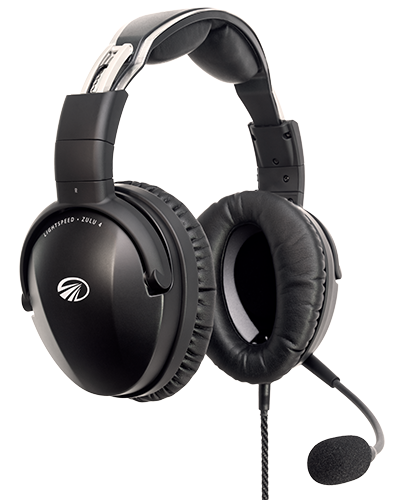
Experience more comfort, more clarity, and more flexibility.
Zulu 4 builds on the success of Lightspeed’s best-selling Zulu series ANR headsets to deliver more comfort, clarity, and flexibility with dual Bluetooth technology with improved outbound audio, a longer mic boom, and FrameFit™ ear seals to deliver unrivaled comfort.
Try for yourself! The Zulu 4 has a 30-day Money Back Guarantee
How Do I Record Flights with Zulu 3 and Other Lightspeed Headsets?
Pilots flying with compatible Zulu 3, or Sierra headsets, as well as some compatible legacy headsets such as the Tango, PFX, and Zulu.2 can continue to use FlightLink, Lightspeed’s original in-flight cockpit recording app for iPhone and iPad.
How to Start a Recording using your Zulu 3, Sierra, or Legacy Lightspeed Headset
- Make sure your headset is connected to your aircraft’s intercom via a LEMO (6-pin), Dual GA, or Heli plug, and connect your headset to your iPhone or iPad using the provided 3.5mm cable plugged into your headset’s controller. Note: The Lightspeed PFX headset will be able to connect to your device via Bluetooth.
- Open the FlightLink App
- Select your preferred recording input:
- iPad or iPhone Mic: Records what your device’s microphone picks up, including ambient cockpit noise.
- Cabin Only: Records audio through your headset microphone without incoming audio from the communications panel.
- Cabin and ATC: Records audio coming through the aircraft’s communications panel along with your headset microphone. This provides the most complete recording of your flight communications.
- Tap the silver and red record button to begin recording.
Learn more about the FlightLink App.
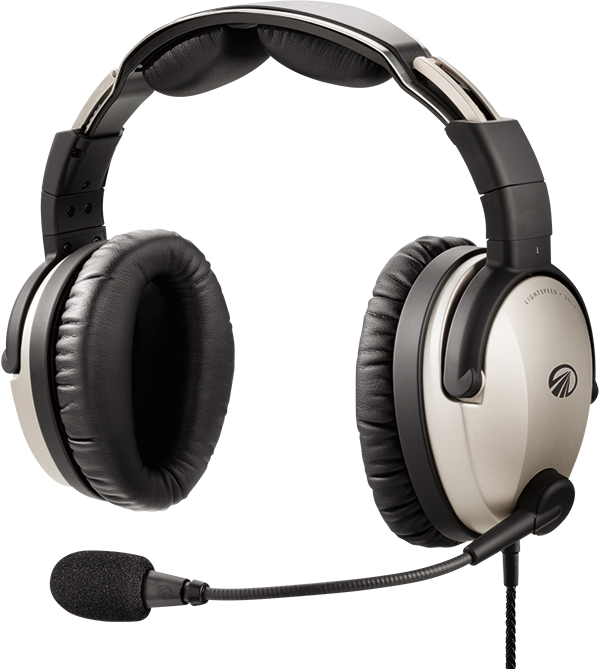
Built for Longevity and with Unsurpassed Attention to Comfort Details
Legendary Lightspeed comfort and durability have earned the loyalty of private pilots, too. Performance ear seals, sturdy cables built around a Kevlar core, an industry-best 7-year warranty, make Zulu 3 the most enduring headset Lightspeed has ever assembled. With full Bluetooth integration, enjoy excellent call clarity, music fidelity, and wireless access to critical audio alerts from aviation apps on mobile devices.
Try for yourself! The Zulu 3 has a 30-day Money Back Guarantee
Can I Replay an ATC Transmission During Flight?
Didn’t quite catch an ATC call?
All Lightspeed headsets and applications allow you to instantly play back audio of the previous two minutes by selecting the desired spot in the recording timeline in the live recording window. The app continues recording in real time while you’re listening to the playback.
Completed recordings can then be accessed through your recording library or by exporting the audio file to your iOS device.
Why Should Pilots Record Their Flight Communications?
Being able to record your flight comms and go back and listen is an important tool if you are a student pilot still learning to fly. Even experienced pilots can benefit from using a recording tool to review and learn from their own experiences, and ensure they heard the tower instructions correctly.
For a CFI, being able to revisit flights with students is also a great way to help student pilots learn and grow. Rather than relying entirely on what the student or instructor remembers after landing, recorded communications give both an opportunity to revisit what happened during the flight.
Be sure to Subscribe to the Lightspeed Aviation Newsletter for updates, resources, and future programs!